Create and edit files
Enable Ordify Productivity in Edit Agent → Integrations to create files, search the web, or run calculations from chat. Dedicated pages cover Excel and spreadsheets and Word and documents. This page is the overview for those tools plus Search and Code.
What you can do
- Excel and spreadsheets — create and edit
.xlsxworkbooks in chat - Word and documents — create and edit
.docxfiles in chat - Search — look up current titles, links, and snippets
- Code — run calculations and produce extra files
Getting started
- Find the agent in your Library or sidebar and click Edit.
- Open the Integrations tab.
- Under Apps, tick Ordify Productivity. It is marked Built-in — there is no connect step.
- On the right, tick Excel, Word, Search, or Code. Leave the rest off.
- Click Save Changes.
- Open chat and describe the file or lookup you need.
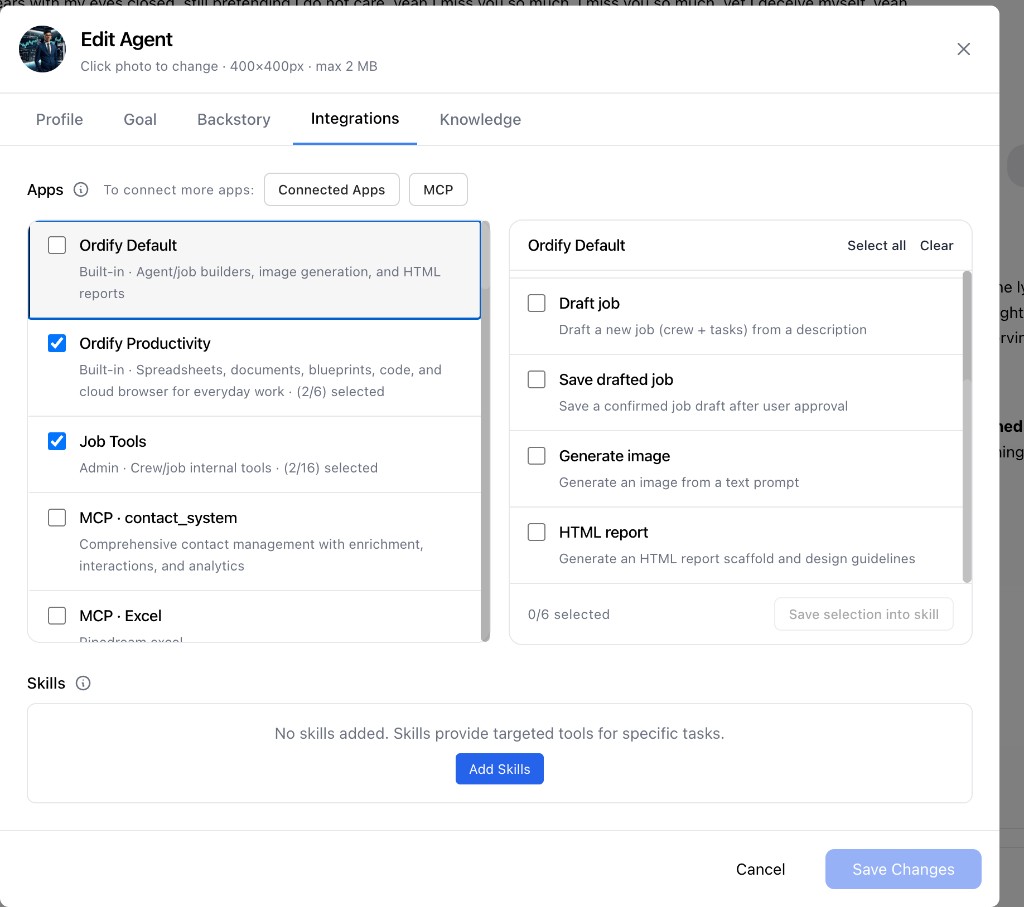
The picker is the same one you use when you connect an app: Select all, Clear, per-tool checkboxes, and Save selection into skill.
Search
Search returns current Google results — titles, links, and snippets. It is not a live page. Use it for facts that change: pricing, news, or a company update.
If you need the agent to open a real page, click through a site, or take a screenshot, use Browser. Search does not log in, click, or take screenshots.
Code
Code runs isolated calculations, transforms data, and produces extra files. Outputs go to the Drive.
Tick Code on its own when the agent should run calculations without Excel or Word. If Excel or Word is already ticked, Code is included.
Blueprints is also on this app — fill blueprints and update living documents from chat.
What's next
- Excel and spreadsheets — create and edit
.xlsxworkbooks in chat - Word and documents — create and edit
.docxfiles in chat - Browser — open live pages, take over to log in, and capture screenshots
- HTML reports — create a standalone HTML report or dashboard