Head of Department
A Head of Department — shown in the app as the department agent — is an agent assigned to a department that automatically inherits access to every job in that department. Assign once, and the agent can invoke, manage, and report on all departmental workflows, including any new jobs added to the department later.
Each department has one department agent at a time.
Why this matters
Without a department agent, managing access across many jobs is manual: each agent must be individually configured with the jobs it can access. As departments grow, this becomes a maintenance burden.
With a department agent:
- One-time setup: Assign an agent to a department once. It immediately gains access to all current jobs.
- Automatic inheritance: Any new job added to the department is automatically accessible — no reconfiguration needed.
- Conversational control: The agent can invoke any of the department's jobs mid-conversation, without leaving the chat.
How it works
Department
├── Job A
├── Job B
├── Job C   ← all automatically accessible to the department agent
└── Department agent
    └── Can invoke any job in this department
The department agent acts as the intelligent front door for the department. Users interact with the agent; the agent decides which job to run based on the request.
Department agent vs. department member
Both relationships are set on the Departments board, but they do different things:
| Agent on the department's Agents board | Department agent | |
|---|---|---|
| How it's set | Drag the agent into the department column | Assign it in the department header |
| How many | Any number per department | Exactly one per department |
| Job access | None granted | All jobs in the department, automatically |
| Purpose | Grouping and discoverability | Department-level coordination and execution |
Placing an agent in a department groups it with that team's work. It does not give the agent access to the department's jobs. Only the assigned department agent inherits job access.
Assigning a department agent
- Navigate to Library and open the Departments view
- Find the department you want to configure
- In the department header, click the agent icon to open Assign Department agent
- Pick an agent from the list, or click Create New Agent
- Click Assign
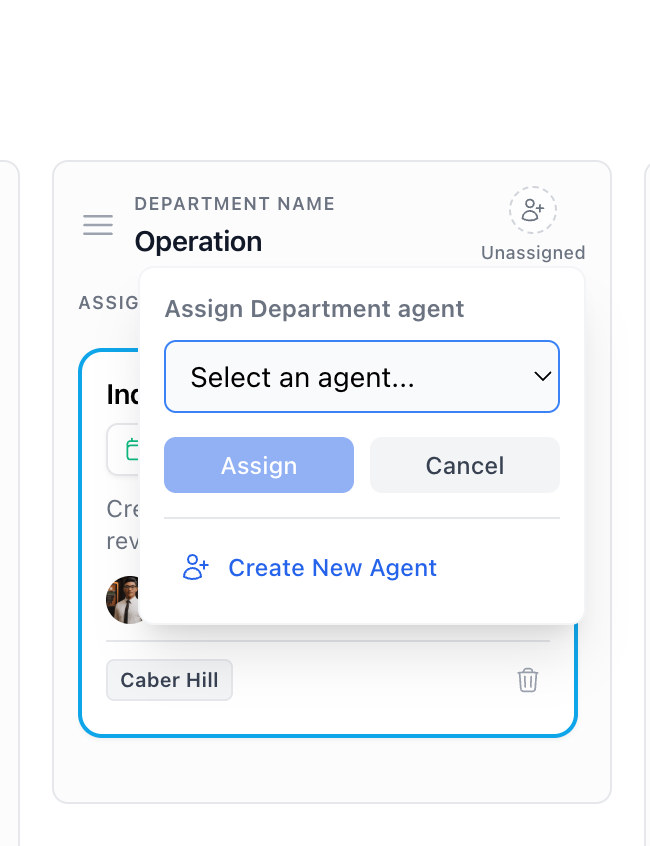
The agent now appears in the department header and has access to all of its jobs.
A department can only have one department agent. When you assign a new one, the previous agent is unassigned and the department's jobs are removed from its job access. If that agent still needs to run those jobs, add them back to it individually before reassigning.
To remove a department agent without replacing it, use the unassign action in the department header. The same rule applies — the department's jobs are removed from that agent's access.
Configuring the department agent
The agent can start routing useful work as soon as it has a clear description and is assigned to a department — it infers which job to run from each request using the job descriptions.
You can improve reliability further by adding instructions that describe:
- How to identify which job matches a given request (when there are several options)
- What inputs to extract from the conversation to pass to each job
- How to handle requests that don't match any available job
- How to report job outcomes back to the user
Example instructions for an "HR Department" agent:
You manage the HR department's automated workflows. When a user makes a request, identify the most appropriate job to invoke:

- Onboarding request → invoke "New Employee Onboarding" job
- Policy question → invoke "Policy Q&A" job
- Performance review → invoke "Performance Review Preparation" job

Extract any required inputs from the conversation (employee name, department, start date, etc.) before invoking a job. Once the job completes, summarize the output for the user.

If the request doesn't match any available job, respond helpfully and offer to connect the user with the HR team directly.
Department agent vs. regular agent
| Regular agent | Department agent | |
|---|---|---|
| Job access | Manually configured per job | All jobs in the department, automatically |
| New job access | Requires manual reconfiguration | Inherited automatically |
| Primary role | Task execution or conversation | Department-level coordination |
Use cases
- Sales: Manages lead qualification, CRM updates, and outreach sequences through conversation
- IT: Handles requests across security scanning, incident response, and infrastructure reporting jobs
- Operations: Coordinates data processing, reporting, and maintenance workflows across the department
What's next
- Departments — create and organize departments before assigning an agent
- Create a job — build the jobs the department agent will run